Overview
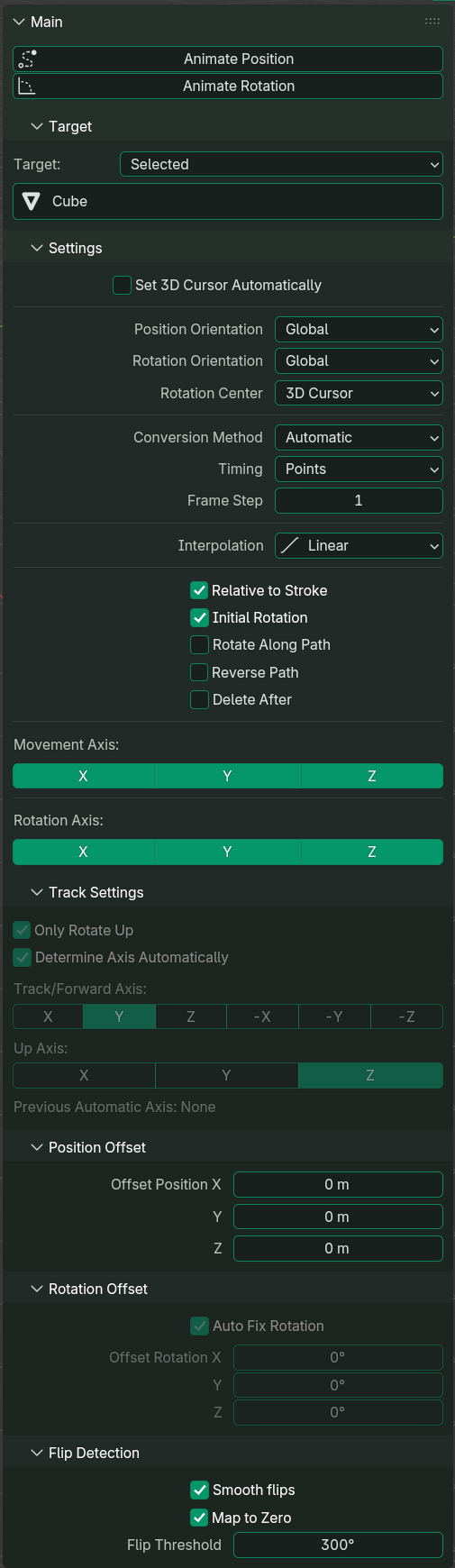
Animate
- Animate Position: Animate object/bone's position based off given stroke path
- Animate Rotation: Animate object/bone's rotation based off given stroke path
Target
- Target: Behaviour to set the target list
- Target Enum: List of affected objects or bones
Settings
- Set 3D Cursor Automatically: When enabled, 3D cursor will be automatically snapped to active object. Does not work for pose bone when using
Selected - Position Orientation: Whether to move based off global or local axis
- Rotation Orientation: Whether to rotate based off global or local axis
- Rotation Center: Origin used to calculate the rotation of a stroke
- Conversion Method: Whether to use whole points, or the intersection only
- Timing: Can be set to be either each individual points/intersection, or set duration
- Total Duration: Total frames will not exceed this number. Only appear if
Timingis set toDuration - Frame Step: Skip every this many frame
- Interpolation: Interpolation type that will be used for keyframes
- Relative to Stroke: When enabled,
Animate Positionposition will be relative to its current position and the stroke path - Initial Rotation: When enabled, both
Animate PositionandAnimate Rotationwill account the object/bone initial rotation before applying the rotation - Rotate Along Path: When enabled,
Animate Positionwill rotate the object along the path - Reverse Path: When enabled, script will reverse the order of the points
- Delete After: When enabled, annotation/grease pencil active frame or curve object will be deleted after using
Animate PositionorAnimate Rotation
- Movement Axis: Defines which axis will affect
Animate Position - Rotation Axis: Defines which axis will affect
Animate Position(ifRotate Along Pathis enabled) orAnimate Rotation
Track Settings
- Only Rotate Up: When enabled,
Animate Positionwill only rotate the up axis only.Rotation Axiswill be suppressed - Determine Axis Automatically: When enabled, track axis and up axis will be determined automatically
- Track/Forward Axis: Forward axis. Disabled if
Determine Axis Automaticallyis enabled - Up Axis: Up axis. Disabled if
Determine Axis Automaticallyis enabled
Position Offset
Property to offset the position when animating the position. Only works for Animate Position.
Rotation Offset
Property to offset the rotation when animating the position. Works for both Animate Position (if Rotate Along Path is enabled) and Animate Rotation.
Flip Detection
- Smooth Flips: When enabled, script will attempt to negate rotation that is greater than the flip threshold. Only works for
Animate PositionwhileRotate Along Pathis enabled - Map to Zero: When enabled, flips will not be greater than 360° and is instead set to 0. Only works for Euler and if
Smooth Flipsis enabled - Flip Threshold: Angle to define flips. If angle difference is greater than this, then proceed to negate this rotation